Luke Benjamin
Conversational forms ask for the same details as a normal web form, but one question at a time. Like a person would. Some are typed. Some run in a chat window. And some, like Talk Kit, let visitors simply say the answer out loud.
Our team keeps saying the same thing in meetings. Chatbots and forms feel outdated. Visitors do not want to fill in boxes, and they do not want to tap through canned chat buttons either. They want to ask a question and get an answer.
In this guide I will explain the three types of conversational forms, rewrite a real quote form as a conversation and show you when a classic form is still the smarter pick. Talk Kit is built by Bigly Sales, so you should know where my bias sits. I will tell you where voice does not fit too.
TL;DR
Conversational forms collect lead details one question at a time instead of showing every box at once. There are three types. One question per screen, a chat style form and a voice agent that asks out loud. They suit short lead capture on phones, where typing into nine boxes is a common reason people give up. Baymard Institute found the average checkout still had 11.3 form fields in 2024 when most sites need about 8. Keep a classic form for long data entry and always offer a typed fallback.
Key Takeaways
- A conversational form asks one question at a time, typed or spoken.
- The three types are one question per screen, chat style and voice.
- Most lead forms only need three to five questions to decide the next step.
- Voice fits phones and after hours visitors. A classic form still wins for long data entry.
- Always keep a typed option for people who cannot or would rather not speak.
- Test against your current form for two weeks and compare finished requests.
Table of contents
- What conversational forms are
- Why the classic web form feels old
- The three types of conversational forms
- A real form, rewritten as a conversation
- Five rules for a good conversational form
- When a classic form is still the right call
- What happens to the lead after
- How to test it against your current form
- How Talk Kit does it
- What it costs
- Conversational forms FAQ
- The bottom line
What conversational forms are
A conversational form is a lead capture form that behaves like a conversation. Instead of a page full of empty boxes, the visitor sees or hears one question. They answer it. Then the next question comes.
The details you collect can be exactly the same as before. Name, need, timing, phone number. What changes is the feel. A form says fill all of this in. A conversation says tell me one thing.
Good conversational forms also react to the answers. If a visitor says they need an emergency repair, the next question is about their address, not their budget for next spring. A static form cannot do that without a lot of setup.
Why the classic web form feels old
Web forms have barely changed in twenty years. They still ask for too much, too early, in tiny boxes.
Checkout forms are the most studied example. Baymard Institute found the average checkout had 11.3 form fields in 2024, down from 12.7 in 2019. Its own testing says most sites need only about 8. If shops that live and die by conversion still ask for too much, your quote form probably does too.
Three things make the problem worse today.
- Phones. Most small business sites get a large share of visits on phones. Typing an address into a small box with your thumb is slow, and autocorrect fights you the whole way.
- Silence after submit. The visitor presses send and hears nothing. Hours later, maybe someone calls. By then they have called a competitor. Here is more on why speed to lead matters.
- Canned chatbots. Many sites swapped the form for a chat window with three buttons. Visitors learned fast that those buttons rarely lead to a real answer.
I covered the qualification side of this in how to qualify website leads without a form. This post is about the format itself and the choices you have.
The three types of conversational forms
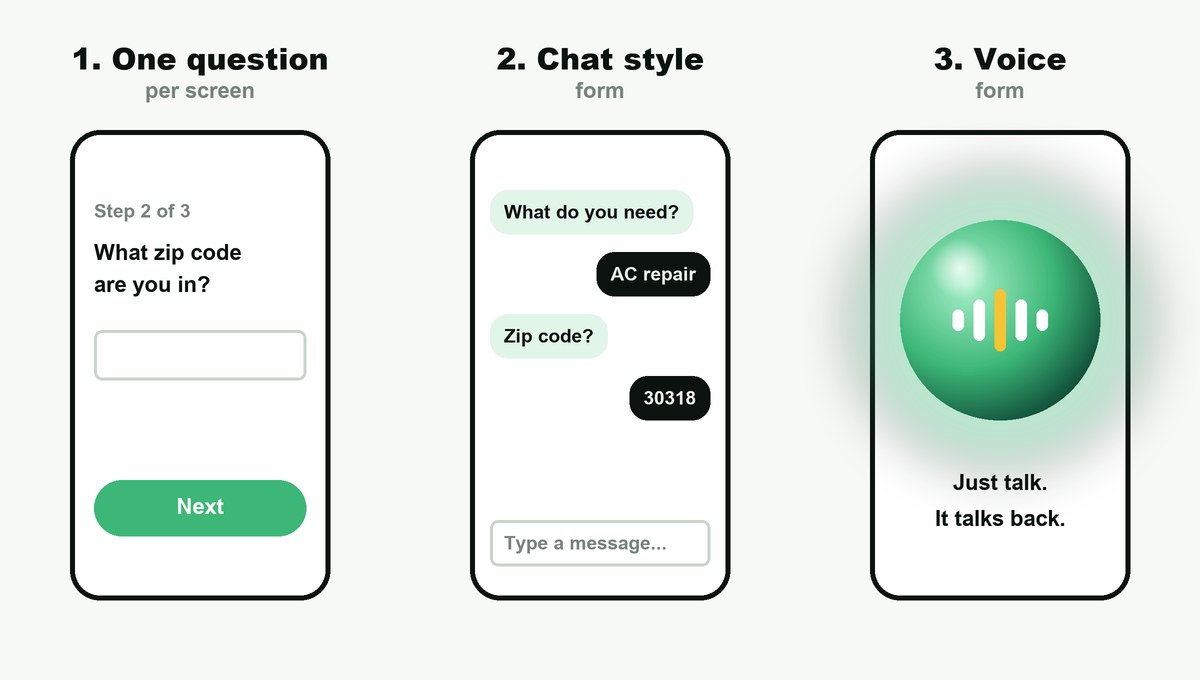
1. One question per screen
This is still a typed form, but it shows one question at a time with a big button to move on. It feels lighter than a long page, and it works well for surveys, quizzes and short quote requests.
Public services use the same idea. The GOV.UK Design System tells teams to start by asking one question per page, because it helps people understand what you are asking and focus on the answer.
2. Chat style forms
Here the questions arrive as chat bubbles and the visitor types or taps a reply. It can feel friendly, and newer AI chat tools can answer questions in between. The weak spot is the same as any chat window on a phone. The visitor still has to type.
3. Voice forms
A voice agent asks the questions out loud and the visitor simply answers. Nothing to type. This is what Talk Kit does. Visitors click a glowing orb and talk, and it talks back. If you have never tried one, here is how a voice assistant on a website works.
| Question | One question per screen | Chat style | Voice |
|---|---|---|---|
| How visitors answer | Type or tap | Type or tap | Speak |
| Feels like | A short quiz | Texting | A phone call on the page |
| Answers questions too | No | Sometimes | Yes, with an AI agent |
| Strongest on | Desktop and short surveys | Desktop | Phones and after hours |
| Weak spot | Still typing | Still typing | Spelling emails out loud |
| Hands a hot lead to a person | No | Rarely live | Talk Kit can ring your closer live |
A real form, rewritten as a conversation
Here is a typical home services quote form. Versions of it sit on a lot of local business sites.
- First name
- Last name
- Phone
- Street address
- City
- Zip code
- Service needed (drop down)
- Tell us about your project (big empty box)
Nine boxes before the visitor gets anything back. Now here is the same request as a conversation.
Agent. Hi, what can we help you with today?
Visitor. My AC stopped blowing cold air.
Agent. Sorry to hear that. Is it out completely, or just weak? And what zip code are you in?
Visitor. Totally out. 30318.
Agent. We cover that area. We have a tech free tomorrow at 9 or 2. Which works, and what number should the tech call?
Three questions. The business gets the problem, the urgency, the area, a booked time and a phone number. The visitor gets an answer and a time slot before they leave the page.
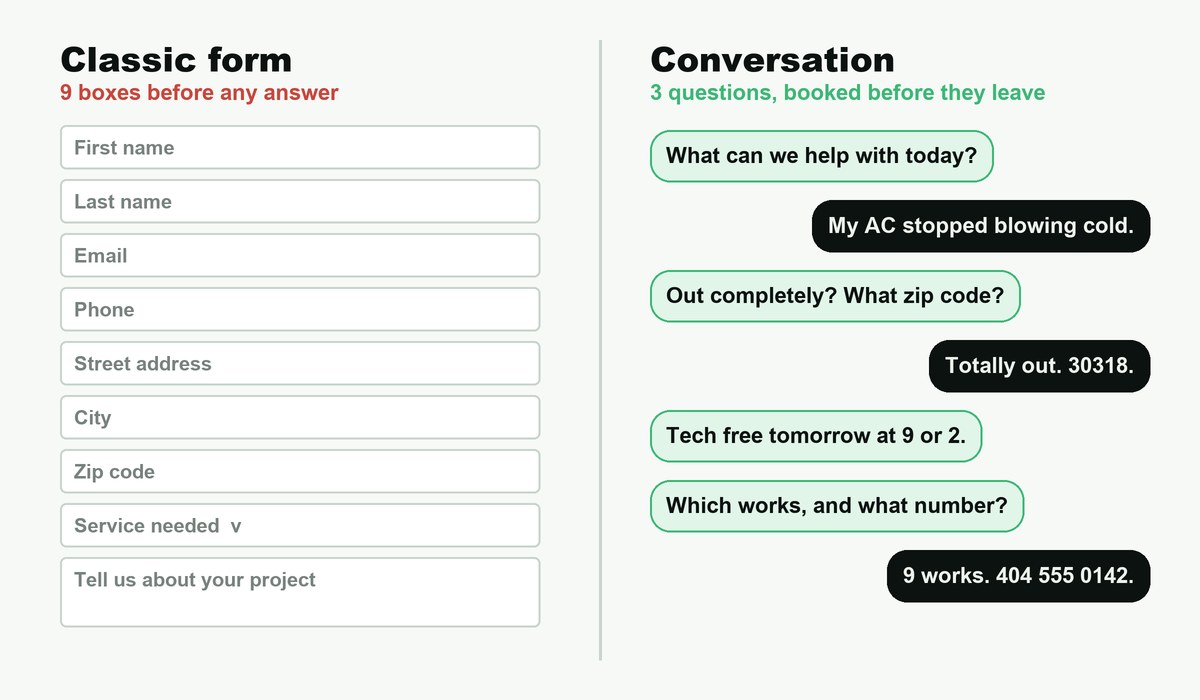
Notice what got dropped. Last name, email and the full street address can all come later, from the tech or the booking text. Ask only what you need for the next step.
Five rules for a good conversational form
- Ask one thing at a time. Two questions in one turn is fine only when they are tiny, like a zip code after a yes or no.
- Start with their problem, not your fields. What can we help with beats what is your name.
- Say why you ask. So the tech can call you when they are on the way gets a phone number far more easily than phone number, required.
- Let them skip. If someone will not give a budget, move on. A partial lead is still a lead.
- Confirm what matters. Read back the phone number or the booking time. For emails, text a link instead of asking someone to spell their address out loud.
Rule five is where voice needs the most care. Spoken emails go wrong easily. A phone number and a text message are far more reliable, which is why Talk Kit can text links and forms straight to the visitor’s phone.
Turn your quote form into a conversation
Visitors ask out loud and Talk Kit answers, books the time or rings your team. Starter is $13.99 a month billed yearly, with every feature included.
Try Talk KitWhen a classic form is still the right call
I like conversational forms, but they are not the answer to everything. Keep a classic form in these cases.
- You need a lot of exact data. Loan applications, insurance quotes with many details or job applications are faster on a page the visitor can scan and fill at their own pace.
- People need to attach files. Photos, plans or documents still belong in an upload box.
- Visitors compare and edit. A form lets people go back and change an answer at a glance.
- Accessibility needs a typed path. Some visitors are deaf, hard of hearing or in a quiet office. The W3C forms tutorial covers how to make a typed form work for everyone.
- Your traffic is tiny. If you get a few visitors a week, a short form and a fast reply from you may be all you need.
Most sites end up with both. A voice or chat agent as the main way in, and a short typed form on the contact page for anyone who prefers it.
What happens to the lead after
A conversational form that just emails you the answers has only fixed half the problem. The other half is what happens next, while the visitor is still interested.
| Visitor | Next step | Why |
|---|---|---|
| Ready to buy now | Connect them to a person live | Interest is highest in the first minutes |
| Interested, not urgent | Book a time on your calendar | A booked time beats a callback promise |
| Wants to pay | Take payment or text a payment link | No hunting for a checkout button |
| Just browsing | Answer the question and save the details | Today’s browser can be next month’s buyer |
Talk Kit handles each of these. It can ring your closer and connect a hot lead live, book a meeting on your calendar when nobody is free, take payment through Stripe and text links by SMS.
How to test it against your current form
Do not switch on faith. Run a simple two week test.
- Write down your current numbers for the last 14 days. Form views, finished forms and leads you actually spoke to.
- Add the conversational option to the same pages. Keep the old form on the contact page.
- Run it for 14 days without changing anything else, like ads or prices.
- Compare finished requests, booked times and leads you spoke to. Not just clicks on the new button.
- Listen to or read ten real conversations. They will tell you which questions confuse people.
| Metric | Classic form | Conversational form |
|---|---|---|
| Started | Clicked into the first box | Answered the first question |
| Finished | Pressed submit | Gave a phone number or booked a time |
| Reached | You spoke to them | You spoke to them, or they were transferred live |
| Time to first reply | Your callback time | Seconds, if the agent answers itself |
How Talk Kit does it
Talk Kit puts a talking orb on your site with one script tag. Here is how it works as a conversational form.
- It reads your site and takes on your tone, so it can answer questions while it collects details.
- You tell it what qualified means in plain English, such as budget, need and timing.
- When a visitor hits that bar, it rings your closer and connects them live. Closer busy? It books the meeting instead.
- It speaks English and Spanish and works out which one the visitor is using.
- It never invents answers about your business. If it does not know, it takes a message.
- Every setting is a plain English request to your coding agent through the Talk Kit MCP, or a simple dashboard.
It works on any site that can hold a script tag, including WordPress, Shopify, Webflow and Squarespace. Here is the step by step WordPress install guide.
What it costs
Every feature is on every plan. You pay for voice minutes.
| Plan | Per month, billed yearly | Per month, billed monthly | Included minutes | Extra minutes |
|---|---|---|---|---|
| Starter | $13.99 | $19.99 | 100 | 20¢ |
| Growth | $69.99 | $99.99 | 700 | 15¢ |
| Pro | $279 | $399 | 3,500 | 12¢ |
| Scale | $1,399 | $1,999 | 20,000 | 10¢ |
Prices were checked on talkkit.ai on November 12, 2026. Talk Kit estimates Starter’s 100 minutes at 50 to 70 full conversations. Billing is in full minute steps, plans renew until you cancel and canceling takes one click.
Conversational forms FAQ
What is a conversational form?
A conversational form collects the same details as a normal web form, but one question at a time, like a person would ask them. It can be typed on one screen per question, run inside a chat window, or spoken out loud by a voice agent. The goal is the same in each case. Fewer visitors give up before they finish.
Are conversational forms better than regular forms?
For short lead capture they often are, because one easy question feels lighter than a wall of boxes. For long data entry, such as applications, tax details or anything with attachments, a classic form is usually faster. Test both on your own traffic for two weeks and compare finished requests, not opinions.
What is a good alternative to a contact form?
Pick the one that matches how your visitors want to reach you. A one question form keeps things typed. A chat window answers questions while it collects details. A voice agent lets visitors just talk, which suits phones. Whatever you choose, keep a plain email address or short form for people who want one.
Do conversational forms reduce form abandonment?
They can, because they remove the moment where a visitor sees nine boxes and leaves. They also let you capture the first answers even if the visitor stops halfway. There is no single number that holds for every site, so measure your own completion rate before and after the change.
Is a chatbot a conversational form?
A chatbot can work as one when it asks questions and saves the answers as a lead. Many chatbots only answer questions and never capture anything. If lead capture is the goal, check that the tool asks your questions, saves the answers and sends hot leads somewhere useful, such as a calendar or your phone.
Can a voice assistant replace my lead capture form?
For many small business sites it can replace the main form, as long as it captures a phone number or books a time and passes the details to you. Keep a short typed option on the contact page for people who cannot or would rather not speak. A voice agent should add a way in, not remove one.
How many questions should a conversational form ask?
As few as you need to decide the next step. For most lead forms that is three to five questions, such as what they need, when they need it and how to reach them. Every extra question should earn its place by changing what you do with the lead.
Are conversational forms accessible?
They can be, but it takes care. Typed versions need proper labels, keyboard support and clear error messages, the same as any form. Voice versions need a typed fallback for people who are deaf, hard of hearing or somewhere they cannot talk. Offer both and nobody gets shut out.
The bottom line
Conversational forms are not a trick. They are just a more human way to ask the same questions. One at a time, starting with the visitor’s problem, and only the questions you need.
Pick the type that fits your visitors. Typed for desktop and long surveys, voice for phones and after hours. Keep a short form for anyone who wants it, then let two weeks of real numbers decide.
Let visitors say it instead of typing it
One script tag puts a talking orb on your site. It answers, books and rings your team when a lead is hot. Cancel in one click.
Get Talk Kit